

Microsoft Copilot Licensing & Data Protection
Three points that companies should now examine
Microsoft is continuously introducing new features and developments for Microsoft Copilot . Currently, there are three changes in particular that companies should not only be aware of but also actively review to keep costs and data privacy under control. Microsoft is implementing new pricing models for Microsoft Copilot licensing and introduced a new rule in March regarding the processing of Microsoft Copilot Prompts outside the EU Data Boundary. Our blog explains what has changed and how you can best address these changes.
1. Microsoft Copilot Data Protection: Processing of Prompts Outside the EU Data Boundary
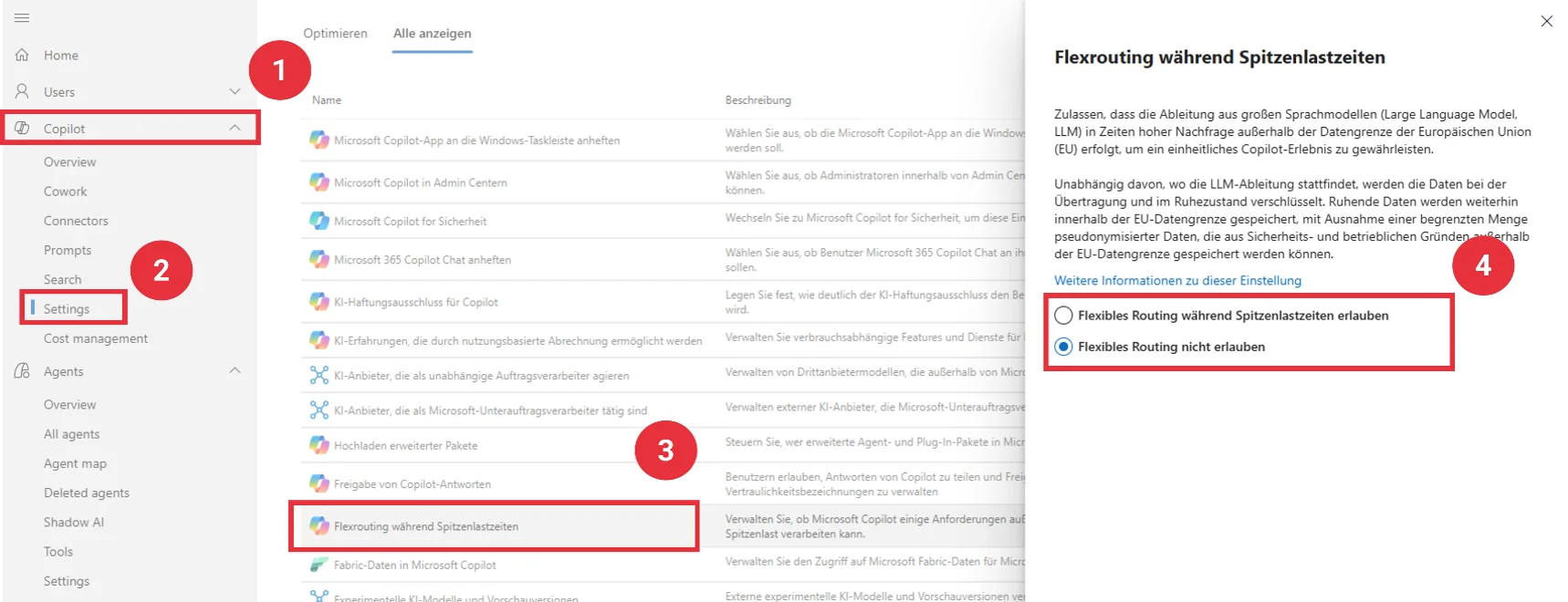
Flex Routing allows Microsoft to offload the processing of Microsoft Copilot prompts to the US, Canada, or Australia during periods of high demand. This setting has been enabled by default since March 25, 2026, meaning that prompt data can be processed outside of Switzerland and Europe. Microsoft justifies this with performance benefits. If you want processing exclusively within the EU data boundary (EU or EFTA countries), you must configure this setting in the M365 Admin Center for Copilot and Copilot Chat. For processing prompts in custom-built agents, the configuration must also be done via the Power Platform Admin Center.
A potential stumbling block: Companies that rely on processing within the EU data boundary must proactively configure this setting in their respective admin center. The crucial factor is whether processing outside the EU data boundary complies with internal guidelines, customer contracts, and regulatory requirements.
Our recommendation: We generally recommend disabling the Flex Routing option for Microsoft Copilot in the M365 Admin Center. Our tests show that disabling this option does not result in any significant performance issues. The situation is different for agents, as flexible geographic data processing is a prerequisite for most automation features.
2. Microsoft Copilot license: Additional costs for extended usage scenarios.
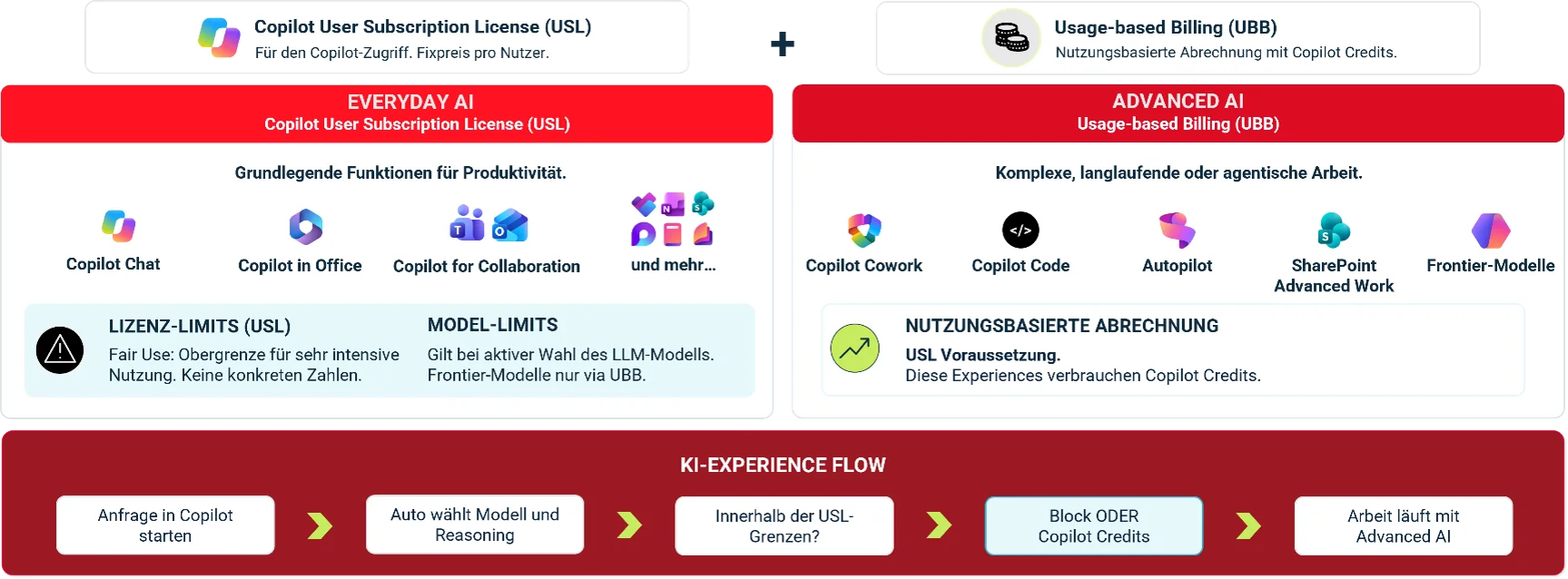
The new licensing model for Microsoft 365 Copilot no longer covers all usage scenarios within the license costs. Basic functions such as Copilot Chat with Work IQ and Copilot in Office are still included in the user license. For advanced features such as Copilot Cowork, certain SharePoint scenarios, and the latest GPT and cloud models (so-called "frontier" models), a Copilot user license is still required, but these are now billed exclusively on a usage-based ( pay-as-you-go ) basis.
To prevent costs from spiraling out of control, so-called "spending policies" should be set up in the admin center. These policies allow you to define budgets and limits for usage-based billing.
A potential pitfall: Having a Copilot license no longer automatically guarantees predictable total costs. Depending on the function, model chosen, and usage, additional, variable fees may apply. If spending policies are not appropriately defined, employees may reach their usage limit and consequently lose access to certain Copilot functions.
Our recommendation: Since certain Copilot features can incur additional costs, licensing, technical approvals, and cost control must be considered together. Copilot governance should define which features are available to which user groups and what costs are permissible. Considerations include:
- Licensing strategy: Microsoft Copilot licensing is increasingly becoming a governance task. It must be determined whether advanced features are required or whether Microsoft Copilot should only be used within the scope of the user license. To this end, the Copilot scenarios used can be classified. Which scenarios occur in our environment, and are they covered by the user license? Where might Copilot credits be incurred?
- Introduction of enhanced features: Extended features can initially be rolled out to a small user group. This group can test the features so that costs, data access, and benefits can be evaluated. This allows you to maintain a better overview of potential costs.
- Set up spending policies: Don't simply adopt the standard spending limits; instead, set your budget based on collected data. Differentiate between target groups and scenarios so you can allocate your budget effectively. Furthermore, implement monitoring and alert thresholds to keep your costs under control.
3. Copilot Credits: Usage-based billing is activated by default.
Based on the new Copilot licensing model, a new default setting for usage-based billing will be introduced on December 1st. For new Microsoft Business subscriptions – regardless of whether licenses already exist in the tenant – usage-based billing will be activated by default and set to a general limit of 4,000 credits per user per month. Since 1 Copilot credit costs CHF 0.01, this equates to CHF 40 per user per month unless you deactivate the default or set a different limit yourself. Billing is based on the actual usage of the extended features (as explained in point 2). ( Source: Microsoft )
Pitfall: Without your intervention, users can spend up to 4,000 credits without your explicit authorization. The default limit is not based on your approvals or budget. For example, with 100 licensed users, the standard limit results in a potential limit of 400,000 credits or CHF 4,000 per month. Therefore, the default setting should absolutely be adjusted based on the considerations outlined in point 2.
Our recommendation: If no licensing or usage strategy has been defined for the extended features, we recommend disabling usage-based billing. If you have allocated a budget for this, you should set specific spending limits based on it.
Setting up Microsoft Copilot governance and licensing correctly
Unsure which settings and pricing models are currently active in your Microsoft tenant?
redIT supports you in reviewing your Copilot configuration, assessing data protection and licensing issues, and establishing practical Copilot governance. Together, we define which functions may be used, how costs are controlled, and which settings meet your compliance requirements.
👉 Questions about Copilot governance or licensing? Contact our Copilot expert Elias Camenzind directly:

Elias Camenzind
Solution Consultant
+41 41 747 51 73
E-mail
Book an appointment online