
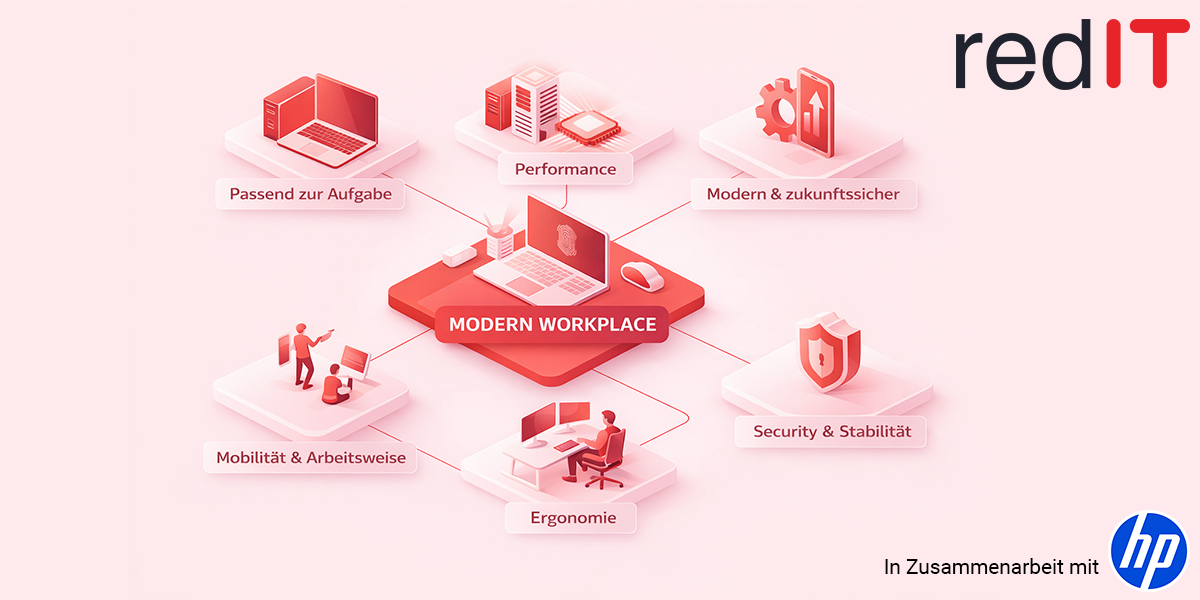
Productivity begins with a modern workplace.
In many companies, the replacement of work equipment is postponed for a long time. Decision-makers often see the workplace as a secondary concern, as long as it still functions. However, the quality of the workplace has a direct impact on productivity, work quality, and employee satisfaction. Slow applications, equipment not suited to the task, or limitations on mobile working are typical signs that a workplace is not optimally set up.
To ensure long-term productivity, workstations should be regularly reviewed, optimized, and replaced as needed. As a guideline, laptops should be replaced after 3 to 5 years , and monitors after 5 to 8 years . Otherwise, technological advancements, increasing performance and security demands, and growing risks of failure will lead to productivity losses that would make planned replacement economically viable. However, since these losses are often not immediately apparent, equipment replacement is frequently postponed for too long.
In this blog, we take a look at the most important factors of a modern workplace and show how you can ensure that your employees' workplaces are optimally set up.
1. Suitable for the task
Central question
Is the workplace tailored to the specific task?
classification
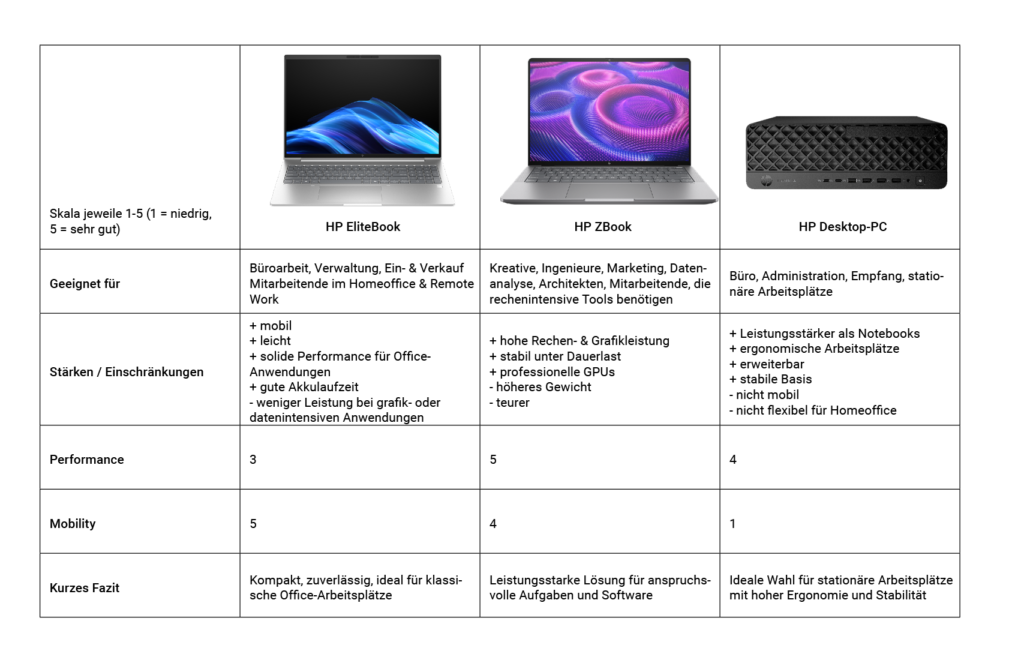
Different roles bring different requirements to the modern workplace. In practice, however, workstations are often set up in a standardized way – regardless of role and tasks. Administrative work has different requirements than creative, technical, or analytical tasks. While an HP EliteBook , HP ProBook , or a compact HP desktop PC is usually sufficient for tasks in purchasing, sales, and administration, marketing, production staff, or technical departments require more powerful systems such as HP workstations . If these different needs are not taken into account, unnecessary limitations in efficiency and work quality arise. A uniform workstation may simplify management, but it is rarely the most productive solution.
When are HP workstations a good choice?
For sustained high computing or graphics loads, such as in architecture, engineering, marketing, or development, traditional business devices are often no longer sufficient. HP workstations are designed for such scenarios and offer stable, reliable performance even under heavy load. Tailor the performance to your specific tasks and choose an HP workstation in these cases.
Self-check
Do employees with very different tasks use the same equipment?
Are the graphics, computing power, and storage capacity suited to the specific task?
Do employees need to adapt their working methods to technology – instead of the other way around?
Are there any roles that regularly reach their technical limits?
Short conclusion
A good workplace is geared towards the task – not towards a standard device.
2. Performance
Central question
Is the workplace's performance sufficient for everyday work?
classification
The performance of work equipment gradually declines, while software, data volumes, and requirements steadily increase. What was once sufficient eventually becomes a bottleneck. Long loading times, delayed multitasking, and interruptions in workflow lead to measurable productivity losses. Regularly monitoring actual performance helps to identify these losses early and take economically sound action.
Self-check
Are there regular waiting times or delays?
Do programs need to be shut down in order to continue working?
Does the system noticeably slow down after prolonged use (e.g., after several hours of work)?
Does the device respond sluggishly when using multiple standard applications simultaneously?
Short conclusion
When work equipment slows down, productivity suffers.
3. Mobility & Working Methods
Central question
Does the workplace support the way people work?
classification
Hybrid and mobile working are now integral parts of many work models. Modern workplaces must be geared towards actual working practices. The crucial factor is whether employees primarily work in a fixed location, work in a hybrid environment, or regularly travel.
- Desktop PCs are ideal for jobs requiring predominantly office-based work, clearly defined workspaces, and a high demand for ergonomic equipment, such as in administration, accounting, or reception roles. They offer stable performance, easy expandability, and optimal ergonomics with large monitors.
- Compact, lightweight notebooks are suitable for employees who regularly work from home. Weight, battery life, and connectivity are key considerations here.
- Laptops with larger screens are ideal for hybrid roles that involve switching between the office, home office, remote work, and meetings, but still regularly work with multiple applications or content simultaneously. They offer a better overview without sacrificing mobility.
Those who choose device types regardless of the activity or remote work arrangement risk productivity losses and unnecessary restrictions in their daily work.
Self-check
Is productive work possible outside the office?
Are the devices lightweight, durable, and reliably suitable for mobile use?
Is it possible to switch seamlessly between the office and working from home?
Are there any limitations to collaboration while traveling?
Short conclusion
A modern workplace adapts to the way people work.
4. Ergonomics
Central question
Is the workplace set up ergonomically?
classification
Ergonomics has a direct impact on concentration, performance, and health. Monitors that are too small or incorrectly positioned, a lack of peripherals, or prolonged work on a laptop can have negative long-term effects. Monitors play a key role in this. Older displays often offer lower resolution, poorer image quality, and fewer ergonomic adjustment options. Regular replacement improves readability, reduces eye strain, and supports efficient work—especially for daily screen time lasting several hours. The health effects develop gradually but lead to decreased productivity and increased absenteeism. An ergonomically designed workstation is therefore a crucial component of a sustainable modern workplace.
Self-check
Are the screen, keyboard, and seating position ergonomically adjusted?
Are there sufficiently large and well-positioned displays?
Can employees customize their workstations?
Are you experiencing an increase in physical symptoms?
Short conclusion
Ergonomics is a crucial factor for sustainable productivity.
5. Security & Stability
Central question
How safe and reliable is the workplace in everyday life?
classification
Work equipment is a critical component of IT security. As equipment ages, security risks, the probability of failure, and support costs increase. Missing security features, limited update capabilities, or hardware defects lead to work interruptions and increased IT effort. Planned equipment replacement improves operational stability, security, and predictability.
Self-check
Are end devices adequately protected against attacks and data loss?
Are security updates being implemented reliably?
How high is the administrative effort required for protection and maintenance?
How critical would absences be in everyday work?
Short conclusion
A modern workplace protects data.
6. Modern & future-proof
Central question
Is the workplace prepared for future requirements?
classification
A modern workplace must be able to support future requirements. Operating systems, applications, and security standards are constantly evolving. If the hardware is at its technical limit, new functions or expansions are often no longer possible. Regular checks and timely upgrades prevent bottlenecks, unplanned costs, and ensure long-term productivity.
A current example is the end of life of Windows 10 in October 2025: Not all existing devices are compatible with Windows 11. In such cases, continued operation is neither secure nor economically viable. Replacing incompatible devices in a timely manner ensures that workplaces can continue to be supported, operated securely, and used productively.
Self-check
Are the devices compatible with current and future operating systems?
Can workstations be expanded or adapted as needed?
Are there performance reserves available for new applications?
Will investments be used long-term?
Short conclusion
Future-proofing avoids unnecessary follow-up costs.
Overview: Devices in the Modern Workplace
Modern Workplace as the key to sustainable productivity
The workplace is not a static construct, but a key factor in productivity. Performance, ergonomics, mobility, safety, and future-proofing must be tailored to the tasks and working methods of the employees. If work equipment is used for too long or not regularly checked, limitations gradually develop that negatively impact efficiency, work quality, and job satisfaction.
Companies benefit from not just equipping workplaces once, but from continuously questioning them: Are performance and working methods still adequate? Are the devices safe, stable, and future-proof? And do they support employees in performing their tasks efficiently?
Regularly reviewing the modern workplace helps to identify bottlenecks early, plan investments strategically, and ensure sustainable productivity. As Computerwoche states in its study "Future Workplace 2025" : "The future workplace is not a perk like foosball tables or fruit baskets, but a strategic lever to make processes related to the workforce faster, more flexible, and more resilient." This conclusion underscores that the modern workplace is not only comfortable but also a crucial factor for successful, future-proof work models.
Unsure if your workplaces are still optimally set up?
Together, we'll analyze your workplace and identify areas for improvement to create a perfectly tailored modern workplace for your employees. Contact us to learn how you can sustainably boost your employees' productivity.